Apex Install and Wiring
This article contains detailed instructions about setting up and installing an Apex sensor.
Video

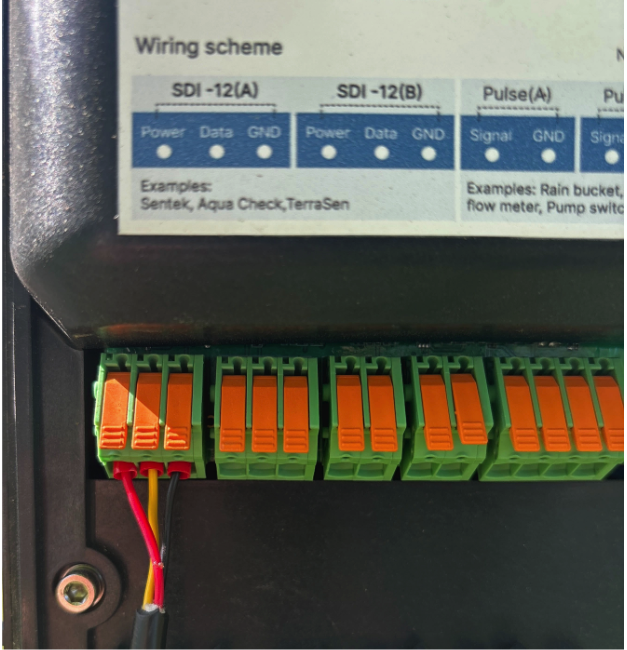
Apex Wiring
Red = Power
Yellow = Data
Black = Ground
Required Materials
- Apex sensor
- Sensor cable
- CropX TD2 Telemetry device - (Check compatibility if TD2 Serial number is less than G202230)
- Installation tools (auger and tripod)
- Cable protection (optional: conduit or loom)
- Water spray bottle
Before You Begin
Ensure the following prior to installation:
- Sensor and cable are free of visible damage
- Installation location is representative of the desired irrigation zone
Installation Procedure
1. Unbox and Inspect
- Remove all components from packaging
- Inspect:
- Sensor housing for damage
- Cable for cuts, kinks, or abrasions
- Connector for dirt or debris
- Avoid tightly coiling the cable
2. Select Installation Location
- Choose a location representative of the crop/root zone
- Avoid:
- Field edges
- Low spots or unusually wet/dry areas
- Clear surface debris before installation
3. Prepare the Soil
- Create a pilot hole using the CropX Apex auger and tripod ONLY
- Ensure hole depth matches intended sensor placement
4. Install the Sensor
- Insert the Apex sensor vertically into the soil
- Ensure:
- Full soil contact along the sensor body
- No air gaps around the sensor
5. Route the Cable
- Route cable toward the telemetry device
- Follow best practices:
- Avoid sharp bends and pinch points
- Keep cable off the ground when possible
- Use protective conduit if needed
- Leave a small amount of slack in the cable
6. Connect to Telemetry Device
- Attach the sensor connector to the appropriate port and wiring configuration as pictured above
- Ensure:
- Secure, tight connection
- Connector is clean and dry
7. Configure in Software
- Begin the install in the CropX app
- Confirm:
- Sensor is detected
- Correct port/channel assignment
- Assign or label the sensor as needed
8. Verify Operation
- Confirm real-time data is being received
- Validate readings: How to tell if readings are right for my soil
- Moist soil → higher readings
- Dry soil → lower readings
- If readings are missing
- Check connections
- Verify system configuration
9. Finalize Installation
- Secure cable using stakes or clips
- Optionally bury cable for protection
- Mark sensor location in tall crops
Best Practices
- Install in representative soil conditions for accurate data
- Ensure firm soil contact—this is critical for performance
- Protect cables from equipment, animals, and environmental damage